6. Testbed
6.1. Testcase
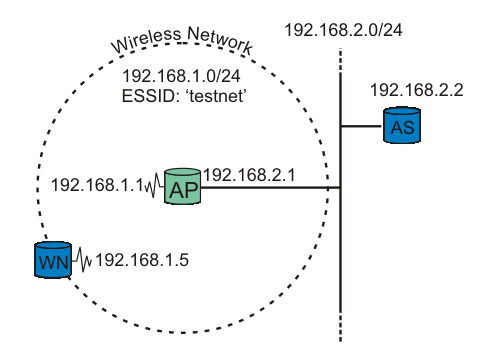
figure testbed: A wireless node request authentication.
Our testbed consists of two nodes and one Access Point (AP). One node functions as the Supplicant (WN), the other as the back-end Authentication Server running RADIUS (AS). The Access Point is the Authenticator. See figure testbed for explanation.
 | It is crucial that the Access Point be able to reach (ping) the Authentication Server, and vice versa! |
6.2. Running some tests
Running some tests
The RADIUS server is started in debug mode. This produces a lot of debug information. The important snippets are below:
# radiusd -X Starting - reading configuration files ... reread_config: reading radiusd.conf Config: including file: /usr/local/etc/raddb/proxy.conf Config: including file: /usr/local/etc/raddb/clients.conf Config: including file: /usr/local/etc/raddb/snmp.conf Config: including file: /usr/local/etc/raddb/eap.conf Config: including file: /usr/local/etc/raddb/sql.conf ...... Module: Loaded MS-CHAP mschap: use_mppe = yes mschap: require_encryption = no mschap: require_strong = no mschap: with_ntdomain_hack = no mschap: passwd = "(null)" mschap: authtype = "MS-CHAP" mschap: ntlm_auth = "(null)" Module: Instantiated mschap (mschap) ...... Module: Loaded eap eap: default_eap_type = "peap"
 eap: timer_expire = 60
eap: ignore_unknown_eap_types = no
eap: cisco_accounting_username_bug = no
rlm_eap: Loaded and initialized type md5
tls: rsa_key_exchange = no
eap: timer_expire = 60
eap: ignore_unknown_eap_types = no
eap: cisco_accounting_username_bug = no
rlm_eap: Loaded and initialized type md5
tls: rsa_key_exchange = no  tls: dh_key_exchange = yes
tls: rsa_key_length = 512
tls: dh_key_length = 512
tls: verify_depth = 0
tls: CA_path = "(null)"
tls: pem_file_type = yes
tls: private_key_file = "/usr/local/etc/raddb/certs/cert-srv.pem"
tls: certificate_file = "/usr/local/etc/raddb/certs/cert-srv.pem"
tls: CA_file = "/usr/local/etc/raddb/certs/demoCA/cacert.pem"
tls: private_key_password = "SecretKeyPass77"
tls: dh_file = "/usr/local/etc/raddb/certs/dh"
tls: random_file = "/usr/local/etc/raddb/certs/random"
tls: fragment_size = 1024
tls: include_length = yes
tls: check_crl = no
tls: check_cert_cn = "(null)"
rlm_eap: Loaded and initialized type tls
peap: default_eap_type = "mschapv2"
tls: dh_key_exchange = yes
tls: rsa_key_length = 512
tls: dh_key_length = 512
tls: verify_depth = 0
tls: CA_path = "(null)"
tls: pem_file_type = yes
tls: private_key_file = "/usr/local/etc/raddb/certs/cert-srv.pem"
tls: certificate_file = "/usr/local/etc/raddb/certs/cert-srv.pem"
tls: CA_file = "/usr/local/etc/raddb/certs/demoCA/cacert.pem"
tls: private_key_password = "SecretKeyPass77"
tls: dh_file = "/usr/local/etc/raddb/certs/dh"
tls: random_file = "/usr/local/etc/raddb/certs/random"
tls: fragment_size = 1024
tls: include_length = yes
tls: check_crl = no
tls: check_cert_cn = "(null)"
rlm_eap: Loaded and initialized type tls
peap: default_eap_type = "mschapv2"  peap: copy_request_to_tunnel = no
peap: use_tunneled_reply = no
peap: proxy_tunneled_request_as_eap = yes
rlm_eap: Loaded and initialized type peap
mschapv2: with_ntdomain_hack = no
rlm_eap: Loaded and initialized type mschapv2
Module: Instantiated eap (eap)
......
Module: Loaded files
files: usersfile = "/usr/local/etc/raddb/users"
peap: copy_request_to_tunnel = no
peap: use_tunneled_reply = no
peap: proxy_tunneled_request_as_eap = yes
rlm_eap: Loaded and initialized type peap
mschapv2: with_ntdomain_hack = no
rlm_eap: Loaded and initialized type mschapv2
Module: Instantiated eap (eap)
......
Module: Loaded files
files: usersfile = "/usr/local/etc/raddb/users"  ......
Module: Instantiated radutmp (radutmp)
Listening on authentication *:1812
Listening on accounting *:1813
Ready to process requests.
......
Module: Instantiated radutmp (radutmp)
Listening on authentication *:1812
Listening on accounting *:1813
Ready to process requests. 
- Default EAP type is set to PEAP.
- RADIUS's TLS settings are initiated here. The certificate type, location, and password are listet here. .:: telegra.ph ::. .:: www.redsea.gov.eg ::.
- Inside the PEAP tunnel, MS-CHAPv2 is used.
- The username/password information is found in the users file.
- RADIUS server started successfully. Waiting for incoming requests.
The radius server is now ready to process requests! [Web Specs: Assembly language]
The most interesting output is included above. If you get any error message instead of the last line, go over the configuration (above) carefully.
Now the Supplicant is ready to get authenticated. Start .:: linkingdirectory.com ::. .:: podcasts.apple.com ::. Xsupplicant in debug mode. Note that we'll see output produced by the two startup scripts: [Debug Recursion] startup.sh and startup2.sh.
  # xsupplicant -c /usr/local/etc/1x/1x.conf -i eth0 -d 6
  Starting /etc/1x/startup.sh
  Finished /etc/1x/startup.sh
  Starting /etc/1x/startup2.sh
  Finished /etc/1x/startup2.sh
At the same time, the RADIUS server is producing a lot of output. Key snippets are shown below:
  ......
  rlm_eap: Request found, released from the list
  rlm_eap: EAP/peap
  rlm_eap: processing type peap
  rlm_eap_peap: Authenticate
  rlm_eap_tls: processing TLS
  eaptls_verify returned 7
  rlm_eap_tls: Done initial handshake
  eaptls_process returned 7
  rlm_eap_peap: EAPTLS_OK
  rlm_eap_peap: Session established.  Decoding tunneled attributes.
  rlm_eap_peap: Received EAP-TLV response.
  rlm_eap_peap: Tunneled data is valid.
  rlm_eap_peap: Success
  rlm_eap: Freeing handler
  modcall[authenticate]: module "eap" returns ok for request 8
modcall: group authenticate returns ok for request 8
Login OK: [testuser/<no User-Password attribute>] (from client testnet port 37 cli 0002a56fa08a)
Sending Access-Accept of id 8 to 192.168.2.1:1032
	MS-MPPE-Recv-Key = 0xf21757b96f52ddaefe084c343778d0082c2c8e12ce18ae10a79c550ae61a5206
	MS-MPPE-Send-Key = 0x5e1321e06a45f7ac9f78fb9d398cab5556bff6c9d003cdf8161683bfb7e7af18
	EAP-Message = 0x030a0004
	Message-Authenticator = 0x00000000000000000000000000000000
	User-Name = "testuser"
- TLS session startup. Doing TLS-handshake.
- The TLS session (PEAP-encrypted tunnel) is up.
- The Supplicant has been authenticated successfully by the RADIUS server. An "Access-Accept" message is sent.
- The MS-MPPE-Recv-Key [RFC2548 section 2.4.3] contains the Pairwise Master Key (PMK) destined to the Authenticator (access point), encrypted with the MPPE Protocol [ .:: syosetu.org ::. RFC3078], using the shared secret between the Authenticator and Authentication Server as key. The Supplicant derives the same PMK from MK, as described in Key Management.
The Authenticator (access point) may also show something like this in its log:
  00:02:16 (Info): Station 0002a56fa08a Associated
  00:02:17 (Info): Station=0002a56fa08a User="testuser" EAP-Authenticated
That's it! The Supplicant is now authenticated to use the Access Point!