📚 LinuxDocs
Topics:
All Pages8021X HOWTOACP ModemACPI HOWTOADSL Bandwidth Man..ATA RAID HOWTOATM Linux HOWTOAX25 HOWTOAccessibility Dev ..Accessibility HOWTOAdv Bash Scr HOWTOAdv Routing HOWTOAntares RAID sparc..Apache Compile HOWTOApache WebDAV LDAP..Assembly HOWTOAstronomy HOWTOAthlon Powersaving..Authentication Gat..Autodir HOWTOAviation HOWTOAvr Microcontrolle..BRIDGE STP HOWTOBTTVBackspaceDeleteBandwidth Limiting..Bangla HOWTOBash Prompt HOWTOBattery PoweredBelarusian HOWTOBelgian HOWTOBeowulf HOWTOBocaBogoMipsBootdisk HOWTOBridgeC++ dlopenC C++Beautifier HO..C editing with VIM..CDROM HOWTOCDServer HOWTOCable ModemCaudium HOWTOClone HOWTOCompaq Remote Insi..Compaq T1500 HOWTOConexant+Rockwell ..Cryptoloop HOWTODB2 HOWTODHCPDSL HOWTODVD Playback HOWTODebian Binary Pack..Debian JigdoDebian and Windows..Disk Encryption HO..Disk on Chip HOWTODocBook Demystific..DocBook InstallDocBook OpenJade S..Ecology HOWTOEmacspeak HOWTOEncourage Women Li..Encrypted Root Fil..Euro Char SupportEvent HOWTOFedora Multimedia ..Finnish HOWTOFirewall PiercingFlash Memory HOWTOFont HOWTOFramebuffer HOWTOGCC HOWTOGIS GRASSGlibc Install HOWTOHOWTO HOWTOHOWTO INDEXHP HOWTOHandspring VisorHard Disk UpgradeHardware HOWTOHighQuality Apps H..Home Electrical Co..IBM7248 HOWTOIO Perf HOWTOIP AliasIP Masquerade HOWTOIRCImplement Sys Call..Indic Fonts HOWTOInfrared HOWTOIngresII HOWTOInstall StrategiesInstallation HOWTOInstallfest HOWTOIntkeybItalian HOWTOJabber Server Farm..JavaStation HOWTOKerberos Infrastru..Kernel HOWTOKerneldKodak Digitalcam H..LDAP HOWTOLDP Reviewer HOWTOLILO crash rescue ..LVM HOWTOLeased LineLegoLinksys Blue Box R..Linux+Win95Linux+Win9x+Grub H..Linux+Windows HOWTOLinux Complete Bac..Linux Crash HOWTOLinux Gamers HOWTOLinux Modem SharingLinux Promise RAID..Linux i386 Boot Co..LinuxGL QuakeWorld..Lotus DominoR5MILO HOWTOMMBase Inst HOWTOMP3 CD BurningMail User HOWTOMajordomo MajorCoo..Man PageMasquerading Simpl..Medicine HOWTOMindTerm SSH HOWTOMobile IPv6 HOWTOMock MainframeModule HOWTOModulesMotorola Surfboard..Mozilla OptimizationMulti Distro DevNCURSES Programmin..NFS HOWTONFS Root Client mi..NIS HOWTONetMeeting HOWTONetwork boot HOWTONvidia OpenGL Conf..OLSR IPv6 HOWTOOnline Troubleshoo..Oracle 9i Fedora 3..PA RISC Linux Boot..PCTel MicroModem C..PHP Nuke HOWTOPPP HOWTOPagerPalmOS HOWTOPartitionPartition Mass Sto..Partition Mass Sto..Partition RescuePine ExchangePortSlavePost Installation ..Postfix Cyrus Web ..Pre Installation C..Print2WinPrinting HOWTOProcess AccountingProgram Library HO..Proxy ARP SubnetQmail ClamAV HOWTOQmail VMailMgr Cou..Querying libiptc H..RPM HOWTOReading List HOWTORedHat CD HOWTOReliance HOWTORemote BridgingRemote Serial Cons..SCSI 2.4 HOWTOSCSI Generic HOWTOSLIP PPP EmulatorSRM HOWTOSSL Certificates H..Scanner HOWTOScientific Computi..Scripting GUI TclTkSecure CVS PserverSecure Programs HO..Security HOWTOSecurity Quickstar..Security Quickstar..Serial Laplink HOWTOSerial Programming..Slovak HOWTOSmall MemorySmart Card HOWTOSoftware Proj Mgmt..Software Release P..Sound HOWTOSpam Filtering for..Speech Recognition..SquashFS HOWTOSybase ASA HOWTOSybase ASE HOWTOSybase PHP ApacheTCP Keepalive HOWTOTamil Linux HOWTOTimePrecision HOWTOTimeSys Linux Inst..Token RingTraffic Control HO..Traffic Control tc..UPS HOWTOUnix Hardware Buye..Unix and Internet ..UpgradeUsenet News HOWTOUser Authenticatio..VB6 to TclVMS to Linux HOWTOVPN HOWTOValgrind HOWTOVideoLAN HOWTOVim HOWTOVirtual WebWebcam HOWTOWikiText HOWTOWindows Newsreader..Wireless Link sys ..Wireless Sync HOWTOXDM XtermXDMCP HOWTOXFree Local multi ..XFree86 HOWTOXFree86 R200XFree86 Second MouseXFree86 Video Timi..XML RPC HOWTOXWindow Overview H..XWindow User HOWTOXinerama HOWTOXterminalsHtml singleI810 HOWTOLibdc1394 HOWTOOpenMosix HOWTOPhhttpd HOWTOPpp sshText

10.5. openMosixprocs

10.5.1. intro

This process-box is really useful for managing the processes running on your cluster. [Developer Guide: FTP]

You should install it on every cluster-node!

The processlist gives an overview what is running where. The second column displays the openMosix-node ID of each process. 0 means local, all other values are remote nodes. Migrated processes are marked with a green icon and non movable processes have a lock. .:: podcasts.apple.com ::.

By double-clicking a process from the list the migrator-window will pop-up for managing e.g. migrating the process. There are also options to migrate the remote processes away, send SIGSTOP and SIGCONT to it or to "renice" it.

If you click on the "manage procs from remote" button a new window will come up (the remote-procs windows) displaying the process currently migrated to this host. .:: telegra.ph ::.

10.5.2. the migrator-window

This dialog will pop up if process from the process box is clicked.
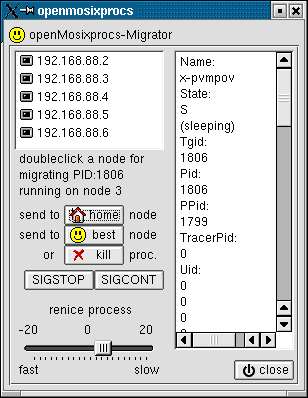
The openMosixview-migrator window displays all nodes in your openMosix-cluster. This window is for managing one process (with additional status-information). By double-clicking on an host from the list the process will migrate to this host. After a short moment the process-icon for the managed process will be green, which means it is running remote.

The "home"-button sends the process to its home node. With the "best"-button the process is send to the best available node in your cluster. This migration is influenced by the load, speed, CPU's and what openMosix "thinks" of each node. It maybe will migrate to the host with the most CPU's and/or the best speed. With the "kill"-button you can kill the process immediately. .:: podcasts.apple.com ::. .:: writeablog.net ::.

To pause a program just click the "SIGSTOP"-button and to continue the "SIGCONT"-button. With the renice-slider below you can renice the current managed process (-20 means very fast, 0 normal and 20 very slow)

10.5.3. managing processes from remote

This dialog will pop up if the "manage procs from remote"-button beneath the process-box is clicked [Reddit: Alpine Linux Discussion] .:: www.mightycause.com ::.

The TabView displays processes that are migrated to the local host. The procs are coming from other nodes in your cluster and currently computed on the host openMosixview is started on. Similar to the two buttons in the migrator-window the process is send home by the "goto home node"-button and send to the best available node by the "goto best node"-button. .:: www.arc.agric.za ::.

Share or Research:

Share on FB Post to X LinkedIn 🤖 Ask AI about this